 Whatsable



TL;DR:
- A WhatsApp notification system via API is built with verified business credentials, approved message templates, and secure token management. Developers must implement robust webhook handling, token rotation, and asynchronous message queuing to ensure reliable, scalable delivery. Proper setup and vigilant maintenance are essential to prevent silent failures and ensure consistent customer communication.
A WhatsApp notification system via API is defined as a backend integration that sends automated, programmatic messages to users through the official Meta WhatsApp Cloud API. Developers use it to deliver order updates, one-time passwords, appointment reminders, and real-time alerts at scale. The WhatsApp Cloud API replaced the legacy On-Premises API, and all new production integrations must use the Cloud version. Building this system correctly requires Meta Business verification, phone number registration, pre-approved message templates, and production-grade security architecture. Get any of those wrong, and your messages either fail silently or never send at all.
How to build a WhatsApp notification system via API: prerequisites and setup
Before you write a single line of code, your environment needs to be fully configured. Skipping setup steps is the most common reason integrations fail in production.
Required accounts and tools:
- A Meta Developer account with a new App created at developers.facebook.com
- WhatsApp product added to that app inside the Meta Developer dashboard
- A verified Meta Business Portfolio (formerly Meta Business Manager)
- A dedicated phone number not already registered with WhatsApp
- A public HTTPS endpoint to receive webhook events from Meta
- A long-lived system user token generated via Meta Business Manager
Production use of the WhatsApp Cloud API requires Meta Business Portfolio verification and phone number registration through a specific API POST call. That verification step is not optional. Meta blocks outbound messages from unverified businesses, regardless of how well your code is written.
| Setup requirement | Tool or resource |
|---|---|
| Meta Developer App | developers.facebook.com |
| Business verification | Meta Business Manager |
| Webhook endpoint | Your server with valid SSL certificate |
| Phone number | Dedicated number, not linked to any WhatsApp account |
| System user token | Meta Business Manager > System Users |
| Template approval | WhatsApp Manager inside Meta Business Suite |

Pro Tip: Use a dedicated phone number for your notification system. Mixing a personal or existing business number into the API setup causes registration conflicts that are difficult to undo.
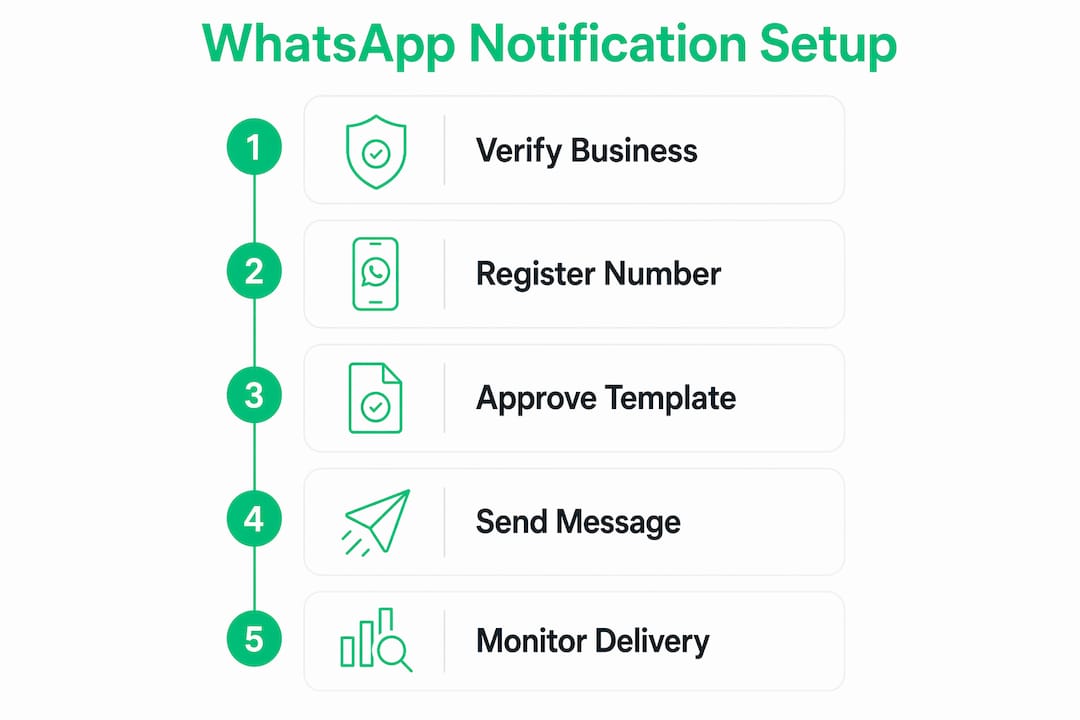
How to register your phone number and get template approval
Phone number registration is a two-step process. First, you verify the number via OTP. Second, you register it through a Graph API POST call to make it production-ready.
- Add your phone number inside the WhatsApp section of your Meta Developer App.
- Request an OTP via the API or the dashboard and verify ownership.
- Send a POST request to
/{phone-number-id}/registerwith your system user token to activate the number for sending. - Confirm registration status by calling
GET /{phone-number-id}and checking theverified_nameandcode_verification_statusfields.
Once your number is active, you need approved message templates before you can send outbound notifications. WhatsApp requires pre-approved templates for all outbound messages unless the user has messaged you first within the past 24 hours. Templates fall into three categories: Utility (transactional alerts, order confirmations), Marketing (promotional content, offers), and Authentication (OTPs, login codes).
When creating templates, you can include dynamic variables using double-brace syntax like {{1}}, add call-to-action buttons, and specify the language. Submit templates through WhatsApp Manager. Meta typically reviews templates within a few minutes to a few hours, though Marketing templates sometimes take longer.
Pro Tip: Name your templates with a clear prefix and version number, such as order_confirm_v2, so you can reuse and iterate without confusion when Meta requests edits.
What are the core API calls for sending WhatsApp notification messages?
All outbound messages go through a single endpoint: POST /{phone-number-id}/messages. The official Graph API /messages endpoint is the only supported method for backend message sending. Never use WhatsApp deep-link URLs like api.whatsapp.com/send for server-side notifications. Those are client-side shortcuts that cause silent failures in automated systems.
A basic cURL request to send a template message looks like this:
curl -X POST \
  "https://graph.facebook.com/v19.0/{PHONE_NUMBER_ID}/messages" \
  -H "Authorization: Bearer {SYSTEM_USER_TOKEN}" \
  -H "Content-Type: application/json" \
  -d '{
    "messaging_product": "whatsapp",
    "to": "15551234567",
    "type": "template",
    "template": {
      "name": "order_confirm_v2",
      "language": { "code": "en_US" },
      "components": [{
        "type": "body",
        "parameters": [{ "type": "text", "text": "ORD-9921" }]
      }]
    }
  }'
The same payload structure works in JavaScript using the fetch API or libraries like axios. The response returns a messages array containing the id of each message. Store that ID. You will need it to match delivery status updates from webhooks.
Key practices for reliable message delivery:
- Always include the
messaging_product: "whatsapp"field. Omitting it causes a 400 error. - Use E.164 format for phone numbers (e.g.,
15551234567with no plus sign in the JSON value). - Pass dynamic variables in the correct order matching your template’s
{{1}},{{2}}placeholders. - Log the returned message ID alongside your internal transaction ID for traceability.
- Handle HTTP 429 rate-limit responses with exponential backoff, not immediate retries.
Pro Tip: Test your template payloads against the WhatsApp test number in the developer dashboard before pointing at real recipients. This catches variable-order mismatches before they reach customers.
How to build a resilient and secure production system
A WhatsApp API integration is a distributed system requiring architectural planning, not a simple API call. Treating it as anything less leads to silent failures, broken token chains, and missed messages at scale.
Security foundations:
- Implement OAuth 2.0 with PKCE for any frontend Embedded Signup flow. Never pass tokens through the frontend without a secure backend exchange.
- Verify every incoming webhook using HMAC-SHA256 signature verification. Meta signs each webhook payload with your app secret. Reject any request where the signature does not match.
- Store system user tokens in a secrets manager (AWS Secrets Manager, HashiCorp Vault, or equivalent). Never hardcode tokens in source code or environment files committed to version control.
Token lifecycle management:
Access tokens expire after 24 hours in test environments. Production systems must use long-lived system user tokens generated through Meta Business Manager. Build a token rotation job that refreshes tokens before expiry and alerts your team if rotation fails. A broken token silently stops all outbound messages with no obvious error at the application layer.
Webhook reliability:
Meta delivers webhooks with at-least-once delivery guarantees. That means duplicate events are normal, not a bug. Your system must handle them correctly.
Implement idempotency keys on every webhook handler. Store the message ID from each incoming event in a cache or database with a short TTL. Before processing any event, check whether that ID has already been handled. This single pattern eliminates duplicate sends, double-billing, and conflicting state updates in your application.
Asynchronous message queueing:
Never send WhatsApp messages synchronously inside a web request handler. Put outbound messages into a queue (RabbitMQ, AWS SQS, or Redis-backed queues) and process them with dedicated workers. This decouples your application from Meta’s API latency, handles retry logic cleanly, and prevents request timeouts from dropping messages.
Audit logging is non-negotiable in production. Log every outbound message attempt, every webhook received, every token rotation event, and every API error with timestamps and correlation IDs. When something breaks at 2:00 AM, your logs are the only way to reconstruct what happened. Integrating AI chatbot capabilities alongside your notification system also lets you handle inbound replies without manual intervention.
What troubleshooting tips should developers know for WhatsApp notification systems?
Most integration failures fall into a small set of repeatable mistakes. Knowing them in advance saves hours of debugging.
Pro Tip: Enable webhook logging from day one, even in development. Most silent failures trace back to a webhook event your system dropped or never received.
The most damaging mistake is using WhatsApp deep-link URLs for backend sending. These URLs open the WhatsApp client app on a device. They do not send messages from a server. Developers who confuse the two build systems that appear to work in manual testing but fail completely in automated pipelines.
| Error type | Root cause | Fix |
|---|---|---|
| 401 Unauthorized | Expired or invalid token | Regenerate system user token in Meta Business Manager |
| 400 Bad Request | Missing messaging_product field or wrong variable order |
Validate payload structure against API docs |
| Template rejected | Prohibited content or wrong category | Review Meta’s template policy and resubmit |
| Webhook not received | Endpoint not publicly accessible or SSL invalid | Verify HTTPS endpoint and Meta webhook subscription |
| Duplicate messages sent | No idempotency check on webhook handler | Add message ID deduplication before processing |
| Phone number not sending | Number not registered via POST to /register |
Complete the registration API call explicitly |
Monitoring delivery status requires subscribing to the messages webhook field and tracking status transitions: sent, delivered, and read. A message stuck at sent for more than a few minutes usually means the recipient’s device is offline, not that your system failed. A message that never reaches sent status points to a payload error or token problem on your end.
For a deeper look at WhatsApp Business API integration patterns and production deployment practices, Whatsable’s technical guides cover the architectural decisions in detail.
Key Takeaways
Building a reliable WhatsApp notification system via API requires verified business credentials, approved message templates, secure token management, and webhook handling built for at-least-once delivery.
| Point | Details |
|---|---|
| Business verification is mandatory | Meta blocks production messaging from unverified Business Portfolios, regardless of code quality. |
| Templates must be pre-approved | All outbound notifications require Meta-approved templates in Utility, Marketing, or Authentication categories. |
| Tokens expire without rotation | Test tokens last 24 hours; production systems need long-lived system user tokens with automated rotation. |
| Webhooks deliver duplicates | Implement idempotency keys on every webhook handler to prevent double processing and data conflicts. |
| Queue messages asynchronously | Synchronous sending inside request handlers causes timeouts and dropped messages under load. |
The part most developers skip until it breaks
I have reviewed a lot of WhatsApp API integrations, and the pattern is almost always the same. Developers get the happy path working in an afternoon, ship it to production, and then spend the next three weeks firefighting. The culprit is almost never the API call itself. It is everything around it.
Token expiry is the most common silent killer. A test token works perfectly for a day, then stops. No exception is thrown in most HTTP clients when a 401 comes back from Meta if the error handling is not explicit. Messages just stop going out, and nobody notices until a customer complains. Building token rotation as a first-class feature, not an afterthought, is what separates stable integrations from fragile ones.
The second thing I see consistently underestimated is webhook reliability. Developers assume webhooks arrive once, in order, and always succeed. Meta’s documentation is clear that maintaining integrations over time is harder than the initial setup. Duplicates happen. Events arrive out of order. Your system needs to handle both without corrupting state.
My honest advice: treat your WhatsApp integration the same way you would treat a payment processing integration. It touches real customer communication, it has compliance implications, and it fails in ways that are hard to reproduce. Build the audit logs, the retry queues, and the monitoring before you go live. You will not regret it.
— Axel
Whatsable makes WhatsApp API notification management practical
Getting the WhatsApp Cloud API working in isolation is one challenge. Keeping it running reliably across templates, tokens, and webhooks at scale is another. Whatsable’s platform handles the operational layer so your team focuses on product logic, not infrastructure maintenance.
Whatsable’s Notifyer System gives you pre-built template management, automated message sequencing, and webhook handling out of the box. It integrates with Zapier, Make, n8n, and Pipedrive, so your notification triggers connect directly to your existing workflows. The Whatsable Bot handles internal team alerts with minimal setup. Review the full feature set and subscription options on the pricing page to find the plan that fits your team’s volume and integration requirements.
FAQ
What is the WhatsApp Cloud API used for?
The WhatsApp Cloud API is Meta’s official backend service for sending automated messages, alerts, OTPs, and notifications to users at scale. It supports text, media, and interactive template messages through the Graph API.
Do I need Meta Business verification to send WhatsApp notifications?
Yes. Production messaging requires a verified Meta Business Portfolio and explicit phone number registration via an API POST call. Unverified accounts are limited to test messaging only.
How long do WhatsApp API access tokens last?
Test tokens expire after 24 hours. Production systems must use long-lived system user tokens generated through Meta Business Manager, combined with automated rotation to prevent silent failures.
What is a WhatsApp message template and why is it required?
A message template is a pre-approved message format submitted to Meta for review. Templates are required for all outbound notifications sent outside a 24-hour user-initiated conversation window, and they fall into Utility, Marketing, or Authentication categories.
How do I handle duplicate webhook events from WhatsApp?
Store the message ID from each incoming webhook event and check for it before processing. This idempotency pattern prevents duplicate sends and conflicting state updates caused by Meta’s at-least-once delivery behavior.