 Whatsable





TL;DR:
- WhatsApp Flows allows businesses to create multi-step, interactive forms directly within chat conversations, reducing user drop-off by keeping interactions inside WhatsApp. It offers two main types: Navigate Flows with static screens and Data Exchange Flows that connect to live backend systems for real-time personalization. Proper deployment of these flows leads to higher engagement, improved data collection, and increased conversion rates.
WhatsApp Flows is defined as a native feature inside WhatsApp Business Platform that lets businesses build multi-step, interactive forms and journeys directly inside a chat conversation. Understanding what is WhatsApp flow feature explained correctly matters because the tool removes the single biggest friction point in mobile conversion: forcing customers to leave WhatsApp and open a browser or app. Built on Meta’s Flow Builder and a JSON-based API, WhatsApp Flows handles bookings, lead capture, surveys, loan pre-approvals, and more without a single redirect. Businesses that deploy flows correctly report measurably higher completion rates and lower support costs.
What is WhatsApp flow and how does it work?
WhatsApp Flows is the industry term Meta uses for its in-chat interactive form system, built on the WhatsApp Business Platform. The feature lets you design structured, multi-screen experiences that customers complete without leaving the conversation thread.

Building a WhatsApp Flow involves two main methods: the visual Flow Builder inside Meta Business Manager, or the Flows API using a programmatic JSON definition. The JSON definition is the essential blueprint for every flow. It specifies screen layouts, navigation paths, validation rules, and the order in which screens appear.
The API uses calls such as CreateWhatsAppFlow and UpdateWhatsAppFlowAssets to create and manage flows at scale. This approach suits development teams that need to generate flows dynamically or maintain dozens of flows across multiple business accounts. The visual Flow Builder, by contrast, suits marketing teams that want to build and test flows without writing code.
Once a customer triggers a flow (typically by tapping a button inside a WhatsApp message), they move through the screens you defined. Form validation rules including required fields and regex patterns run client-side before submission. This means bad data gets caught before it ever reaches your backend.
When the customer completes the flow, their input arrives as a structured JSON payload labeled nfm_reply. That payload integrates with platforms like Zapier, Make, n8n, or custom CRM systems via webhooks. The data updates contact records, triggers follow-up sequences, or feeds into sales pipelines automatically.
Pro Tip: Build your first flow in the visual Flow Builder to understand the screen structure, then switch to the JSON API for production deployments where you need version control and automation.
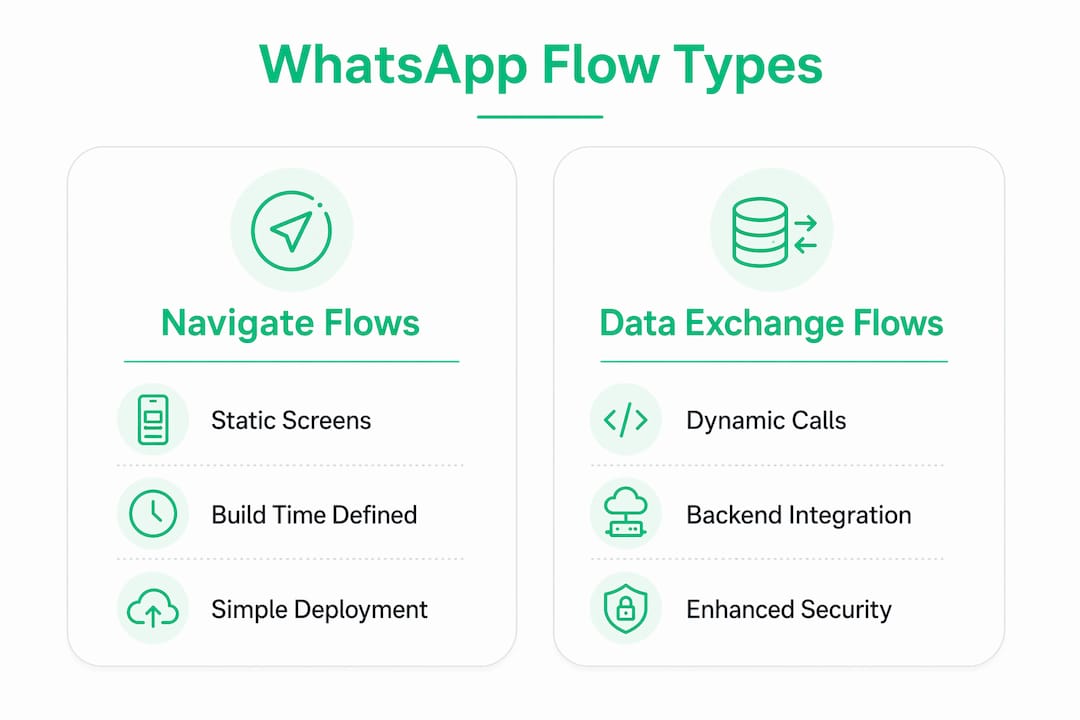
What are the two types of WhatsApp Flows?
WhatsApp Flows come in two architectural types: Navigate Flows and Data Exchange Flows. Choosing the right type determines how much backend work you need and how personalized the experience can be.
| Feature | Navigate Flows | Data Exchange Flows |
|---|---|---|
| Screen content | Static, defined at build time | Dynamic, fetched from backend in real time |
| Backend required | No | Yes, with encrypted endpoints |
| Best for | Simple forms, surveys, signups | Appointment slots, live inventory, loan checks |
| Developer effort | Low | Medium to high |
| Personalization | Limited | Full, based on live data |
Navigate Flows use static, pre-defined screens configured entirely at build time. They are simpler to deploy and require no backend infrastructure beyond receiving the final JSON payload. A customer satisfaction survey or a newsletter signup form fits this type well.
Data Exchange Flows dynamically call backend endpoints on each screen transition. This enables features like cascading dropdowns, live appointment slot availability, and real-time input validation against a live database. A customer booking a clinic appointment sees only the slots that are actually open, not a static list that may already be full.
The security requirement for Data Exchange Flows is significant. Backend endpoints must encrypt requests and return encrypted responses to meet WhatsApp’s data privacy standards. Your servers must handle this encryption correctly, or the flow will fail validation before it ever reaches customers.
Businesses starting with Navigate Flows often transition to Data Exchange Flows once they see the engagement lift from the simpler version. The added backend complexity pays off when personalization drives completion rates higher.
Pro Tip: Start with a Navigate Flow for your first campaign. Measure completion rates. If customers drop off at a specific screen, that screen is a candidate for dynamic Data Exchange logic.
What business use cases benefit most from WhatsApp Flows?
WhatsApp Flows deliver the clearest return on investment when the task being completed has high intent and would otherwise require a redirect to a website or app. The feature closes the gap between a conversation and a completed transaction.
- Lead capture and signups. Businesses run signup forms during peak campaigns directly inside WhatsApp messages. Customers fill in name, email, and preferences without leaving the chat. Completion rates outperform web landing pages because the friction of opening a browser is eliminated.
- Appointment booking. Healthcare providers, salons, and service businesses use Data Exchange Flows to show real-time availability and confirm bookings instantly. Farmacias del Ahorro achieved a 2.6X increase in appointments by automating consult bookings through WhatsApp Flows.
- Insurance quotes and loan pre-approvals. Financial services firms collect structured customer data through multi-screen flows. The structured JSON response feeds directly into underwriting or CRM systems, cutting manual data entry.
- Surveys and feedback collection. Post-purchase surveys sent as flows see higher response rates than email surveys. Customers respond in the same thread where they received their order confirmation.
- Support triage. Businesses use flows to collect issue details before routing to a human agent. The agent receives a structured summary instead of an unstructured chat transcript.
Meta highlights that flows reduce drop-off by keeping high-intent tasks inside the chat environment. The alternative, sending a link to a web form, introduces browser load time, login friction, and mobile keyboard switching. Each of those steps loses customers.
Flow responses are stored as nested custom attributes inside CRM profiles. Platforms like Braze automatically generate custom attribute schemas to manage these structured responses within user profiles. That means every completed flow enriches your customer data automatically.
Best practices and common pitfalls when using WhatsApp Flows
WhatsApp Flows reward careful planning and punish shortcuts. The most common mistakes come from underestimating the publishing lifecycle and misaligning flows with the wrong customer moments.
- Manage versions deliberately. Published flows cannot be edited directly. Updates require reverting to draft status and republishing. Only flows in DRAFT status can be deleted. Published or deprecated flows remain in the system indefinitely. Treat each published flow like a software release: test thoroughly before publishing.
- Pass Meta validation before launch. Meta runs automated validation checks on flow JSON before allowing publication. Skipping a test run in the Flow Builder before API deployment is the fastest way to delay a campaign launch.
- Align flows with high-intent moments. Triggering a multi-screen flow immediately after a customer sends a first message is too early. Flows work best when the customer has already expressed a specific intent, such as asking about pricing or requesting an appointment.
- Respect the 24-hour messaging window. WhatsApp’s standard messaging rules apply to flows. You can only send a flow to a customer within 24 hours of their last message, unless you use a pre-approved template message to reopen the window.
- Flows are mobile-only. WhatsApp Flows do not render on WhatsApp Web or desktop clients. Design every screen for a mobile viewport and test on actual devices before launch.
Pro Tip: Map your flow screens against your existing web funnel. If your web form has a 60% drop-off at step three, your WhatsApp Flow will likely have the same problem at the equivalent screen. Fix the logic before you build, not after.
Key Takeaways
WhatsApp Flows is the most direct path from a chat conversation to a completed customer action, and businesses that deploy them correctly see measurable gains in conversion and data quality.
| Point | Details |
|---|---|
| Core definition | WhatsApp Flows enable multi-step, interactive forms inside WhatsApp chats without redirecting customers. |
| Two flow types | Navigate Flows use static screens; Data Exchange Flows call live backend endpoints for real-time personalization. |
| Data handling | Completed flows return structured JSON payloads that update CRM records and trigger automated workflows. |
| Version control | Published flows cannot be edited directly; always revert to draft, update, and republish with proper testing. |
| Best use cases | Bookings, lead capture, surveys, and loan pre-approvals deliver the strongest return on flow investment. |
Why most businesses underestimate WhatsApp Flows
I have watched businesses treat WhatsApp Flows as a fancy form builder, and that framing costs them. The real value is not the form. It is the context. A customer who just asked about your pricing and then receives a booking flow inside the same conversation is in a completely different mental state than someone who clicks a link and lands on a generic web page. That context is worth more than any A/B test on button color.
The backend integration is where most teams stall. Data Exchange Flows require encrypted endpoints, and many businesses discover mid-project that their existing CRM or booking system does not expose the right API. My advice: audit your backend before you design your screens. Know what data you can fetch in real time and what you cannot. Build the Navigate Flow version first, ship it, and use the revenue from improved conversions to fund the Data Exchange upgrade.
The future of WhatsApp Flows is clearly toward richer, more dynamic experiences. Meta continues to expand the component library and the types of interactions flows can handle. Businesses that build the internal capability now, including the JSON skills and the backend infrastructure, will have a significant head start when those new components arrive.
— Axel
How Whatsable helps you build and manage WhatsApp Flows
Whatsable is built for businesses that want to move from understanding WhatsApp Flows to actually running them at scale. The platform connects flow response data directly to automated follow-up sequences, CRM updates, and team alerts without requiring custom development for every integration.
Whatsable’s Notifyer System integrates with Zapier, Make, n8n, and Pipedrive out of the box, which means the structured JSON payloads from your completed flows feed into your existing tools automatically. The WhatsAble Bot handles internal notifications so your team knows the moment a high-value flow is completed. If you are ready to put WhatsApp Flows to work for your business, visit Whatsable to see how the platform handles the full automation stack.
FAQ
What is a WhatsApp Flow?
A WhatsApp Flow is a multi-screen, interactive form that customers complete inside a WhatsApp chat. It is built using Meta’s Flow Builder or the Flows API and handles tasks like bookings, signups, and surveys without redirecting users to a website.
How does WhatsApp Flow work technically?
A Flow JSON definition specifies screen layouts, navigation, and validation rules. When a customer completes the flow, their input returns as a structured nfm_reply JSON payload that integrates with CRM systems and automation tools via webhooks.
What is the difference between Navigate and Data Exchange Flows?
Navigate Flows use static, pre-built screens with no backend required. Data Exchange Flows call live backend endpoints on each screen transition, enabling real-time data like appointment availability or personalized pricing.
Can published WhatsApp Flows be edited?
No. Published flows cannot be edited directly. You must revert the flow to draft status, make your changes, and republish after passing Meta’s validation checks.
What results do businesses see from WhatsApp Flows?
Results vary by use case, but Farmacias del Ahorro reported a 2.6X increase in appointments after automating consult bookings through WhatsApp Flows. Businesses consistently report higher completion rates compared to web-based forms.