 Whatsable



TL;DR:
- The WhatsApp message window policy limits free-form business replies to 24 hours after a customer message. After the window closes, only pre-approved templates with documented opt-in consent are allowed, and each message costs money. Businesses must understand this rule to avoid enforcement actions like rate-limiting or account suspension.
The WhatsApp message window policy is defined as a 24-hour conversation window, triggered by an inbound customer message, during which businesses can send free-form replies without restriction. Outside that window, only pre-approved message templates are permitted. For business leaders and compliance officers, understanding this rule is not optional. It determines what you can send, when you can send it, and what happens to your account if you get it wrong.
What is the WhatsApp message window policy?
The official industry term for this rule is the WhatsApp Business Messaging Policy, and it governs every business account on the platform. The core mechanism is straightforward. When a customer sends your business a message, a 24-hour window opens. During that window, your team or automation can reply freely, without needing pre-approved content or paying per-message fees.
The window does not reset when your business replies. The window resets only when the customer sends another message. That distinction matters enormously in practice. If a customer messages you on monday morning and you reply that afternoon, the clock does not restart. If the customer replies again on tuesday, a fresh 24-hour window opens from that point.
Non-compliance carries real consequences. Violations trigger enforcement quickly, including rate-limiting within hours and potential account suspension within days. For any business running customer communications at scale, that risk is not theoretical.
How does the 24-hour conversation window work?
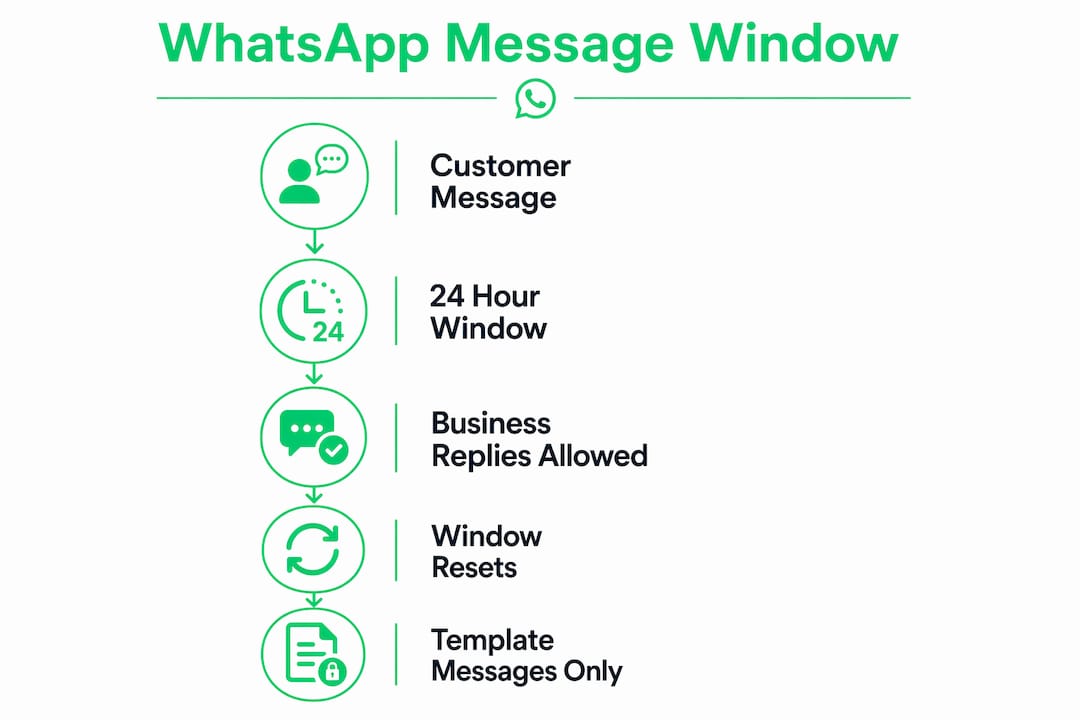
The mechanics of the window follow a clear sequence. Understanding each step prevents the most common compliance mistakes.
- Customer sends a message. The 24-hour window opens at the exact timestamp of that inbound message.
- Your business can reply freely. Any message type, any content, no template required, and no per-message charge applies.
- Customer replies again. The window resets from the timestamp of that new inbound message.
- Customer goes silent. The window expires 24 hours after their last message. After that point, only approved templates can be sent.
- Business sends a template. A per-message fee applies, and the template must have been pre-approved by Meta.
Within the window, your team can send product recommendations, answer complaints, share documents, and follow up on open issues. The conversation feels natural because it is. WhatsApp designed this window to mirror how people actually talk, not how businesses prefer to broadcast.
Pro Tip: Set up automated alerts inside your CRM or messaging platform to flag conversations approaching the 23-hour mark. That gives your team one hour to respond before the window closes and a paid template becomes necessary.

Responsiveness during this window is a direct business advantage. A customer who messages you and receives a fast, helpful reply is far more likely to convert or stay loyal than one who waits hours for a response. The policy rewards businesses that treat WhatsApp as a real-time channel, not a broadcast queue.
What are approved message templates and when are they required?
When the 24-hour window closes, the rules change completely. Free-form messages are free within the window. Outside it, every business-initiated message must use a pre-approved template, and each message carries a per-message cost that varies by country.
Meta organizes approved templates into three categories:
- Marketing templates: Promotional content, offers, product announcements, and re-engagement campaigns. These carry the highest per-message cost in most regions.
- Utility templates: Transactional messages like order confirmations, shipping updates, appointment reminders, and payment receipts. These are priced lower than marketing templates in most markets.
- Authentication templates: One-time passwords and verification codes. These follow their own pricing tier and strict content rules.
Every template must be submitted to Meta for review before use. The review process checks for policy compliance, content clarity, and correct formatting. Templates that contain prohibited content, misleading claims, or unsupported product categories are rejected.
| Template type | Typical use case | Requires opt-in? |
|---|---|---|
| Marketing | Promotions, offers, re-engagement | Yes |
| Utility | Order updates, reminders, receipts | Yes |
| Authentication | OTPs, verification codes | Yes |
Explicit prior opt-in is mandatory for all three categories. Sending a template to a contact who has not opted in is a direct policy violation. The consequences range from template rejection to account suspension, depending on the volume and pattern of violations.
Businesses that ignore this rule often discover the problem only after their account quality rating drops. By then, message volume limits may already be in place.
How do consent and opt-in requirements affect compliance?
Opt-in is the foundation of WhatsApp business messaging compliance. Before your business can initiate any conversation outside the 24-hour window, the customer must have explicitly agreed to receive messages from you on WhatsApp.
Key requirements for compliant opt-in practices include:
- Source and timestamp stamping. Every opt-in record must capture where and when the customer consented. A database entry without a timestamp does not satisfy the requirement.
- Clear opt-out handling. When a customer replies with STOP or a similar opt-out signal, your system must honor that request immediately. Continued messaging after an opt-out is a serious violation.
- Channel-specific consent. Consent collected for email marketing does not transfer to WhatsApp. The opt-in must be specific to WhatsApp communication.
- No pre-checked boxes. Consent must be an active choice, not a default setting the customer has to uncheck.
The difference between user-initiated and business-initiated conversations is significant from a compliance standpoint. User-initiated conversations open the free window automatically. Business-initiated conversations require a pre-approved template and documented opt-in, regardless of any prior relationship.
Negative user feedback directly reduces your account’s quality rating. A lower quality rating restricts how many messages you can send per day. Sustained low ratings can result in account suspension. The feedback loop is fast and automated, so a single bad campaign can affect your entire messaging operation within hours.
Pro Tip: Audit your opt-in records quarterly. Verify that every contact in your WhatsApp list has a documented source, timestamp, and opt-in method. Contacts without complete records should be removed from business-initiated campaigns until consent is re-confirmed.
What are best practices for complying with the WhatsApp message window policy?
Compliance is not a one-time setup. It requires ongoing operational discipline across your messaging team, your automation tools, and your broader compliance program.
- Respond within the window. Prioritize inbound WhatsApp messages the same way you prioritize inbound phone calls. A missed window means a paid template is required for the next message.
- Build human escalation paths. Automation must include clear routes to a human agent. Accepted escalation methods include in-chat agent transfer, phone, email, web support, and in-store visits. Bots that trap customers in loops without a human exit violate policy.
- Monitor your quality rating. Check your WhatsApp Business account quality dashboard regularly. A declining rating is an early warning sign that your messaging practices are generating complaints.
- Coordinate with your commerce policy obligations. Businesses must align their messaging policy compliance with the WhatsApp Commerce Policy. The commerce policy governs which products and services can be promoted on the platform. Violating commerce policy while staying technically compliant on messaging still puts your account at risk.
“Many brands focus entirely on messaging rules and overlook the commerce policy entirely. That blind spot is one of the most common reasons accounts get restricted without warning.” — WhatsApp Business Policy Compliance: The Complete 2026 Rulebook
WhatsApp uses both automated and human review systems to detect violations including spam, scams, and content that endangers user safety. Users can report accounts directly. Personal messages remain end-to-end encrypted and are not visible to reviewers, but metadata patterns and user reports trigger enforcement actions.
The businesses that stay compliant long-term treat WhatsApp messaging policy as a living document, not a box to check during onboarding. Meta updates its policies regularly, and 2026 has brought tighter enforcement on template content and opt-in documentation.
Key Takeaways
The WhatsApp Business Messaging Policy defines a strict 24-hour window for free-form replies, after which only pre-approved templates with documented opt-in consent are permitted.
| Point | Details |
|---|---|
| 24-hour window trigger | The window opens when a customer messages you and resets only when they message again. |
| Template categories | Marketing, Utility, and Authentication templates each carry per-message costs outside the window. |
| Opt-in documentation | Every contact must have a timestamped, source-stamped opt-in record before receiving business-initiated messages. |
| Quality rating risk | Negative feedback lowers your quality rating and can restrict or suspend your account quickly. |
| Commerce policy alignment | Messaging compliance alone is not enough. Commerce policy violations also jeopardize your account. |
Why most businesses misread this policy until it costs them
I have worked with business leaders who assumed WhatsApp messaging worked like email marketing. They built large contact lists, drafted broadcast campaigns, and hit send. The account restrictions that followed were predictable to anyone who had read the policy carefully, but genuinely surprising to teams that had not.
The most persistent misunderstanding I see is around the window reset. Leaders assume that replying to a customer extends the window. It does not. Only the customer’s next message resets the clock. That single misread leads to template violations that could have been avoided entirely with a 10-minute policy review.
The second issue is treating opt-in as a checkbox rather than a documented record. Consent that cannot be proven is consent that does not exist from a compliance standpoint. I recommend building opt-in capture directly into your CRM workflow, with automatic source and timestamp logging, before you send a single business-initiated message.
The future of WhatsApp messaging policy is moving toward stricter enforcement, not looser. Meta has financial and reputational incentives to keep the platform free of spam. Businesses that build compliant systems now will face fewer disruptions as enforcement tightens. Those that cut corners will find account restrictions arriving faster and lasting longer. The policy is not the obstacle. It is the framework that keeps the channel valuable for everyone using it.
— Axel
Whatsable’s tools for policy-compliant WhatsApp messaging
Staying compliant with WhatsApp message guidelines while running campaigns at scale requires the right infrastructure.
Whatsable’s Notifyer System gives businesses the tools to automate follow-up sequences, manage opt-in records, and integrate with platforms like Zapier, Make, n8n, and Pipedrive. The platform includes AI-powered chatbots with built-in human escalation paths, which directly addresses one of the most common compliance gaps. Whatsable also provides detailed analytics so your team can monitor message performance and quality signals before they become account-level problems. Review Whatsable’s pricing plans to find the right tier for your team’s messaging volume and compliance requirements.
FAQ
What is the WhatsApp message window policy?
The WhatsApp message window policy is a rule that limits free-form business messaging to a 24-hour period triggered by an inbound customer message. After that window closes, businesses must use pre-approved message templates and pay per-message fees.
When does the 24-hour window reset?
The window resets only when the customer sends a new message, not when the business replies. Businesses cannot extend the window by sending additional messages.
What happens if a business messages outside the window without a template?
Sending free-form messages outside the 24-hour window violates the WhatsApp Business Messaging Policy. Enforcement includes rate-limiting within hours and potential account suspension within days.
Is opt-in consent required for all WhatsApp business messages?
Explicit opt-in is required for all business-initiated messages sent outside the 24-hour window. Opt-in records must include the source and timestamp of consent to satisfy WhatsApp compliance requirements.
Do Marketing, Utility, and Authentication templates cost the same?
No. Each template category carries different per-message costs, and pricing varies by country. Marketing templates are typically the most expensive, while Authentication templates follow a separate pricing structure.