 Whatsable





Automated notifications are event-driven messages that fire automatically when a defined condition is met, delivering time-sensitive updates across channels like WhatsApp without anyone pressing send. For businesses running customer engagement or internal team communication on WhatsApp, they solve three real problems:
- Speed: Messages reach customers or teammates in seconds, not minutes, cutting human response lag out of the loop entirely.
- Consistency: Pre-approved templates and audit trails keep every message on-brand and defensible, which matters when regulators or customers ask questions.
- Scale: The same workflow that sends ten order confirmations sends ten thousand, with the same reliability and measurable delivery data.
WhatsApp adds a layer of specificity here. The platform distinguishes between template messages (pre-approved, used for proactive outbound) and session messages (free-form, only within a 24-hour customer-initiated window). Getting that distinction wrong can get your number flagged. For U.S. businesses, TCPA-style consent and privacy rules also apply to WhatsApp messaging. Consult legal counsel before launching any outbound campaign.
Table of Contents
- How do automated notifications actually work?
- What WhatsApp-specific rules do you need to configure first?
- What can you actually automate on WhatsApp?
- What design and operational rules keep automations performing?
- How do delivery status and batching affect your reporting?
- How do you implement a WhatsApp notification system?
- When does a managed WhatsApp automation platform make sense?
- Key Takeaways
- The gap between “set it and forget it” and what actually works
- Whatsable gets you to production faster
- Useful sources
- FAQ
How do automated notifications actually work?
Every automated notification follows the same pipeline: event detection → trigger rules → message selection → channel dispatch → delivery, retries, and reporting. A customer places an order (event), the system checks whether they opted in and which template applies (trigger rules and selection), sends the WhatsApp message (dispatch), and logs whether it was delivered, read, or failed (reporting).
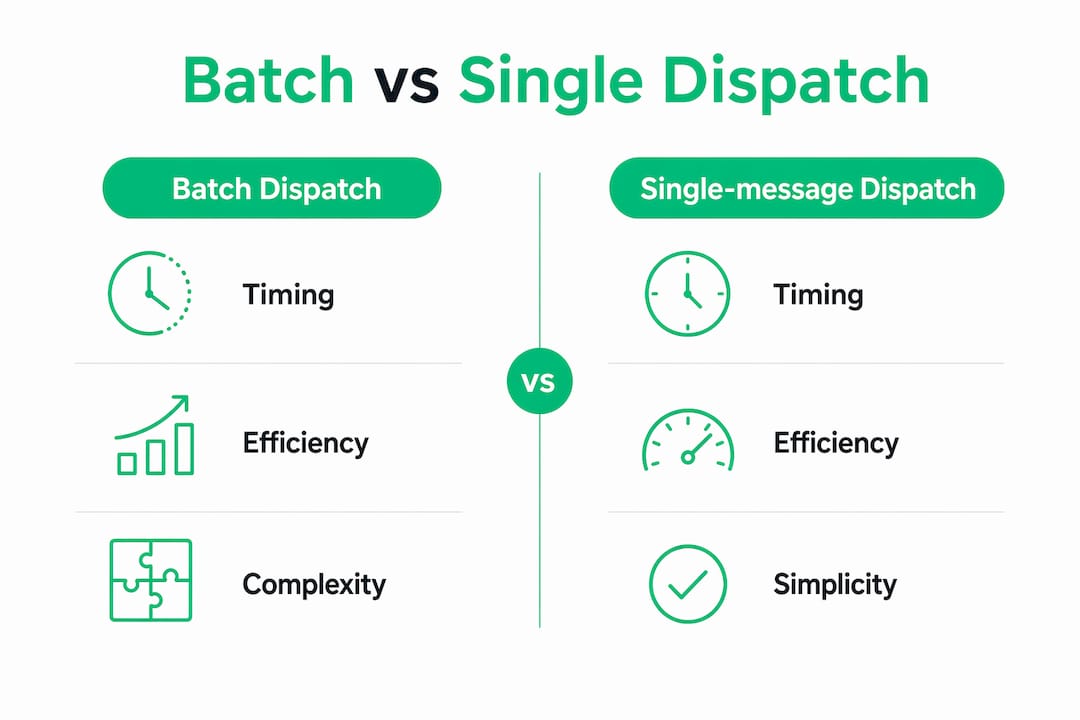
Where platforms differ is in how they dispatch messages. Batch processing groups multiple messages and sends them together, which improves throughput for large campaigns but makes individual-event attribution harder. Single-message (real-time) dispatch fires one message per event, giving you cleaner per-event reporting and faster delivery for transactional flows. As OneSignal’s documentation notes, batched sends can cause campaigns to appear as multiple delivery events in reporting, which distorts analytics if you’re not accounting for it.
| Dimension | Batch dispatch | Single-message dispatch |
|---|---|---|
| Timing | Delayed by batch interval | Near real-time |
| Reporting | Multiple events per campaign | One event per message |
| Best for | Promotional broadcasts, newsletters | Order updates, alerts, reminders |
| Retry behavior | Retries grouped with batch | Per-message retry logic |
A mass notification system adds a centralized orchestration layer on top of this: it manages multiple channels simultaneously, routes to fallbacks when one channel fails, and can trigger automatically from connected data feeds or sensors.

What WhatsApp-specific rules do you need to configure first?
Before a single automated message goes out, work through this checklist:
- Business API vs. Business App: Automation at scale requires the WhatsApp Business API, not the standard Business App. The App caps you at manual sends and limited automation.
- Template messages vs. session messages: Use pre-approved templates for all proactive outbound messages (order confirmations, payment reminders, appointment alerts). Session messages are only valid within 24 hours of a customer-initiated conversation.
- Opt-in requirements: Explicit opt-in is mandatory before sending any template message. Document it.
- Rate limits and template review: Meta reviews and approves templates before use. Factor in review time when planning campaigns.
- Phone number registration and display names: Your business display name must be verified and match your brand identity.
U.S. compliance note: TCPA-style rules and FCC regulations govern commercial messaging consent in the United States. Before automating outbound WhatsApp messages to customers, review your WhatsApp automation compliance checklist and confirm your approach with qualified legal counsel.
What can you actually automate on WhatsApp?
Customer-facing notifications
- Order confirmations: “Your order #4821 is confirmed. Estimated delivery: Thursday.” Fires the moment a purchase is recorded in your CRM.
- Delivery updates: Real-time status changes from your logistics system, sent as template messages.
- Appointment reminders: 24-hour and 2-hour reminders reduce no-shows without a single manual send.
- Payment reminders: A due-date alert with a payment link, triggered by your billing system.
- Promotional opt-ins: Only where customers have explicitly opted in; use sparingly and with clear unsubscribe paths.
Internal team alerts
- IT outage notifications: System monitoring tools detect a failure and immediately alert on-call engineers via WhatsApp. Employee notification systems consistently show faster incident response when multichannel alerts include proof-of-delivery metrics.
- Cybersecurity breach alerts: Triggered by SIEM tools, routed to security leads with escalation rules.
- On-call escalations: If the first responder doesn’t acknowledge within five minutes, the alert escalates automatically.
- HR and safety communications: Shift changes, safety incidents, or mandatory policy acknowledgments sent to specific teams.
When a workflow touches multiple audiences or requires guaranteed delivery, multi-channel outreach combining WhatsApp with SMS and email is worth the added complexity. WhatsApp-only flows work well when your audience is already active on the platform and opt-in rates are high.
What design and operational rules keep automations performing?
Do:
- Write short copy. If the message takes more than five seconds to read, it’s too long.
- Use personalization tokens (first name, order number, appointment time) for every template.
- Set cadence limits. No customer should receive more than two to three automated messages per week from the same number.
- Always verify consent before the first send and log it.
- Build fallback channels: if WhatsApp delivery fails, route to SMS or email.
- Run A/B tests on template copy before full rollout, and always test in a staging environment first.
Don’t:
- Send promotional messages to users who opted in only for transactional updates.
- Ignore opt-out signals. A single missed unsubscribe request can trigger a complaint.
- Skip the staging environment. A misconfigured trigger can flood thousands of contacts in minutes.
Pro Tip: Apply frequency caps and relevance scoring at the trigger level, not just the template level. If a customer already received a delivery update today, suppress the promotional message scheduled for the same afternoon. Backoff rules that increase the gap between messages after a user ignores two in a row reduce opt-outs significantly.
Automated push notifications deliver higher retention and ROI when configured with segmentation and personalization, compared to generic broadcast sends. The same principle applies directly to WhatsApp: targeted, relevant messages outperform volume every time. For scheduling patterns that reduce notification fatigue, scheduled message automation covers practical cadence frameworks.
How do delivery status and batching affect your reporting?
Every message moves through a status taxonomy: queued → dispatched → delivered → read/seen → failed or retried. For campaign reporting, these statuses are your ground truth. A “delivered” status means the message reached the device; “read” confirms the recipient opened it. Failed messages should trigger an automatic retry, and persistent failures should alert your ops team.
Batching changes this picture. When you send a large broadcast in batch mode, the platform may log multiple delivery events for what you consider one campaign send. If your analytics dashboard counts events rather than campaigns, your numbers will look inflated. Account for this in your reporting setup from day one.
For monitoring, require these from any platform you use:
- Published SLA and uptime commitment
- Real-time health checks and alerting on failed-delivery spikes
- End-to-end message tests (send a test message through the full pipeline, not just to a sandbox)
- Sampling of delivered messages to verify content integrity
AI-driven triggers, which analyze external data feeds to fire alerts automatically, introduce a specific risk: false positives. A weather sensor triggering an evacuation alert for the wrong zip code is a real failure mode. Build human-review checkpoints into any AI-triggered flow until you’ve validated the trigger logic over several weeks of live data.
How do you implement a WhatsApp notification system?
Phased rollout timeline
A structured pilot approach consistently reduces deployment risk:
- Pilot (weeks 1–2): Pick one workflow (e.g., order confirmations). Configure templates, get Meta approval, test in staging, send to a small internal group.
- Expand (weeks 3–6): Add two to three more workflows. Bring in your first real customer segment. Monitor delivery rates and opt-outs daily.
- Full rollout (weeks 7–12): Activate all planned workflows. Integrate with CRM, Zapier, Make, n8n, or Pipedrive. Hand off monitoring to your ops team.
Cost factors to plan for
- Message volume and per-message API fees from Meta
- Template review cycles (time cost, not just money)
- Phone number registration and verification
- Developer time for API and webhook integration
- Monitoring infrastructure and redundancy
- Onboarding and ongoing support from your platform vendor
Technical checklist
- APIs and webhooks configured and tested end-to-end
- Template library built and approved before go-live
- CRM fields mapped to personalization tokens
- Staging environment separate from production
- Fallback channel (SMS or email) configured
- SSO or identity integration for internal team access
For the API layer specifically, building a WhatsApp notification system via API covers the technical setup in detail.
When does a managed WhatsApp automation platform make sense?
Building the full stack yourself, API integration, template management, retry logic, delivery reporting, and fallback routing, takes weeks and ongoing developer attention. A managed platform handles that infrastructure so your team focuses on the workflows, not the plumbing.
The features businesses typically need: template management with Meta submission support, multichannel fallback routing, native integrations with Zapier, Make, n8n, and Pipedrive, delivery reporting with read receipts, anti-block measures for bulk sends, and human onboarding support.
Whatsable covers all of these through two products. Notifyer System handles customer-facing flows: unlimited branded WhatsApp messages, automated follow-up sequences, bulk messaging with anti-block measures, and detailed analytics. Whatsable Bot handles internal team alerts: quick setup, workflow automation, and direct integration with your existing tools.
A concrete example: an order update fires in your CRM, Notifyer System sends the approved WhatsApp template to the customer, and if delivery fails after retries, Whatsable Bot automatically alerts your ops team on WhatsApp so someone can follow up manually. The whole loop runs without human intervention unless something breaks.
Onboarding with Whatsable includes human support (not just documentation), staging environment access, and SLA commitments on uptime and availability.
Key Takeaways
Automated WhatsApp notifications deliver speed, consistency, and scale only when the technical pipeline, compliance requirements, and delivery monitoring are all configured correctly from the start.
| Point | Details |
|---|---|
| Start with one workflow | Pilot order confirmations or appointment reminders before adding complexity. |
| Compliance first | Verify opt-ins, use approved templates for outbound, and review TCPA rules with legal counsel. |
| Monitor delivery statuses | Track queued, delivered, read, failed, and retried states; account for batching artifacts in reporting. |
| Pilot in two weeks | Run a two-week pilot with a small segment before expanding to full customer lists. |
| Whatsable for managed automation | Notifyer System and Whatsable Bot cover customer-facing and internal alert flows with native Zapier, Make, n8n, and Pipedrive integrations. |
The gap between “set it and forget it” and what actually works
Most teams underestimate how much ongoing attention automated notifications require after launch. The setup is the easy part. What breaks things six weeks in is a template that gets rejected after a Meta policy update, a batching configuration that inflates your delivery numbers and masks a real failure spike, or a trigger rule that fires on a data field that’s sometimes null.
The businesses that get real value from WhatsApp automation are the ones that treat it like a live system, not a one-time project. That means weekly delivery audits, a clear escalation path when failure rates climb, and someone who owns the template library and keeps it current. AI-driven triggers are genuinely useful for speed, but they need a human review layer until the logic is proven. Start with deterministic rules (event X fires message Y), validate them over a real customer segment, and only then layer in behavioral or AI-based triggers.
The other thing most guides skip: your opt-out rate is a leading indicator, not a lagging one. If it climbs above your baseline in the first two weeks of a new workflow, the message, the cadence, or the audience segment is wrong. Fix it before Meta notices the engagement drop and flags your number.
Whatsable gets you to production faster
Most of the friction in WhatsApp automation comes before the first message sends: API access, template approvals, retry logic, delivery reporting, and integration with the tools your team already uses. Whatsable removes that friction. Notifyer System gives you unlimited branded WhatsApp messages, built-in anti-block protection, and direct connections to Zapier, Make, n8n, and Pipedrive, with human onboarding support and a published SLA. Whatsable Bot adds internal team alerts in minutes, not weeks.
If you’re ready to move from planning to a live pilot, check Whatsable’s pricing and reach out to the team. Onboarding support is included, and the integrations are already built.
Useful sources
- WhatsApp Business API documentation (Meta) — official API reference for template management, rate limits, and phone number registration
- FCC TCPA resources — U.S. rules governing commercial text and call consent
- FedRAMP program overview — federal cloud security authorization relevant to public sector deployments
- FirstNet (AT&T) — dedicated network for first responders; relevant for public safety notification readiness
- Zapier integration docs — connecting WhatsApp automation to thousands of business tools
- Make (formerly Integromat) docs — visual workflow builder for WhatsApp automation scenarios
- n8n documentation — open-source workflow automation with WhatsApp API nodes
- Pipedrive API documentation — CRM event triggers for deal-stage and contact-based notifications
- OneSignal automated messages documentation — batching behavior and delivery reporting reference
- Noggin: 7 Benefits of Mass Notification Software — overview of FedRAMP/FirstNet-certified platform capabilities and compliance considerations
FAQ
What are automated notifications in simple terms?
Automated notifications are messages that send themselves when a specific event occurs, like a purchase, a missed payment, or a system alert, without anyone manually triggering them.
What’s the difference between a template message and a session message on WhatsApp?
Template messages are Meta-approved and used for proactive outbound sends (order updates, reminders). Session messages are free-form but only allowed within 24 hours of a customer-initiated conversation.
How does batching affect WhatsApp notification reporting?
Batch sends can register as multiple delivery events in your analytics, making campaign totals look inflated. Use single-message dispatch for transactional flows where per-event accuracy matters.
Do U.S. businesses need consent before sending automated WhatsApp messages?
Yes. Explicit opt-in is required under WhatsApp’s own policies, and U.S. TCPA-style rules add additional consent requirements for commercial messaging. Always document opt-ins and consult legal counsel before launching outbound campaigns.
How does Whatsable support WhatsApp notification automation?
Whatsable’s Notifyer System handles customer-facing WhatsApp automation with template management, bulk messaging, anti-block measures, and integrations with Zapier, Make, n8n, and Pipedrive. Whatsable Bot covers internal team alerts with quick setup and workflow automation.